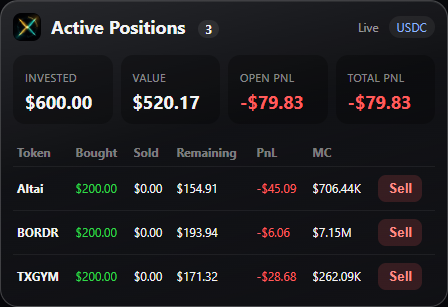
01 / YOUR POSITIONS
The whole picture. In one place.
See invested capital, current value and paper PnL across open positions. Close part or all of a position directly from the overlay.
 CaishenX
Get CaishenX
A better space to practise
Your next move starts here. Practise buys and sells on Axiom, FOMO and GMGN, with a paper-trading overlay that stays in your flow.
Choose your system. Both downloads are available below.
No wallet connection. No approval required.
Built for your
everyday terminals.
Less switching. More focus.
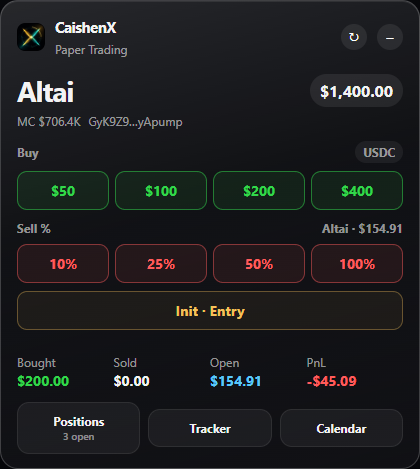
Paper buys, open positions and account PnL, right where you make your decisions. A separate practice space inside the pages you already use.
See invested capital, current value and paper PnL across open positions. Close part or all of a position directly from the overlay.
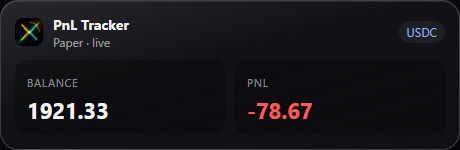
A floating tracker keeps paper equity and PnL close. Drag it to a spot that works for your chart.
Actual CaishenX interface. Screenshots contain example paper positions, not performance claims.
Practise with simulated funds. The overlay does not place real orders or connect to your wallet.
Positions, trade history and settings stay in your browser profile. No server account to approve.
Load the extension and start practising. Use the popup to switch the overlay on or off.
A place for every paper balance
Keep your practice balances separate. The overlay selects the appropriate paper account for the supported page and chain.
SOL paper balance
Shared ETH paper account
Separate native paper balance
Paper balance in USDC
From download to first paper trade
Choose Windows or macOS. Both use the same paper-trading extension and include one manual “Load unpacked” step. A current Chrome-based browser is required; Chrome is the macOS reference browser.
Run the Windows MSI. It includes the extension, places it in E:\CaishenX-runtime\extension and registers the updater. No licence key or device approval.
Open your browser’s Extensions page, enable Developer mode and choose Load unpacked. Select the CaishenX folder shown by the installer.
Visit Axiom, FOMO or GMGN and use the CaishenX paper panel. Later, apply available updates from the overlay and reload the page when prompted.
Open the DMG and copy its CaishenX folder to a permanent location. In Terminal, run /bin/bash followed by the path to its install.sh. It installs this user's universal update helper and extension; no Windows MSI or administrator password.
Open chrome://extensions, enable Developer mode and choose Load unpacked. Select ~/Library/Application Support/CaishenX/extension. Current Chrome on macOS 13 Ventura or newer is required. Safari and iOS are not supported.
Open Axiom, FOMO or GMGN and use only the CaishenX paper controls. Apply verified extension updates from the overlay, then reload the page. Keep the same extension folder and browser profile to retain local positions and settings.
Paper trading for learning.
No wallet. No approval queue.
Unsigned Windows build · unchanged release
Windows release information is included in this page.
Universal arm64 + x86_64 · Developer ID / notarization pending
macOS release information is included in this page.
Download the extension ZIP and extract it to a permanent folder. In your browser’s Extensions page, enable Developer mode, choose Load unpacked and select that folder. The ZIP runs without the Windows updater; the MSI installs the updater for you.
Keep the existing extension installed in the same browser profile when updating. Locally cached positions and settings are retained. Positions stored only on the former server are not fetched. Removing the extension or browser profile can remove your local paper data.
Your paper accounts are stored locally, with no licence-server check. The trading pages and current market prices still need an internet connection. If a required exchange rate is unavailable, a paper trade may need to wait for a valid price.